



淘宝镜像源:https://registry.npmmirror.com/
各包管理设置淘宝镜像源
yarn config set registry https://registry.npmmirror.com/
npm config set registry https://registry.npmmirror.com/
pnpm config set registry https://registry.npmmirror.com/
yarn info There appears to be trouble with your network connection. Retrying...
- 检查自身网络
- 检查代理网络
-
更换镜像源
更换安装依赖的镜像,使用淘宝镜像安装:
yarn config set registry https://registry.npm.taobao.org -
删除 yarn.lock 文件重新安装
这个还有一个可能导致的问题就是已经存在yarn.lock文件,这个时候设置国内源再安装还是使用已经存在的地址的
node-sass
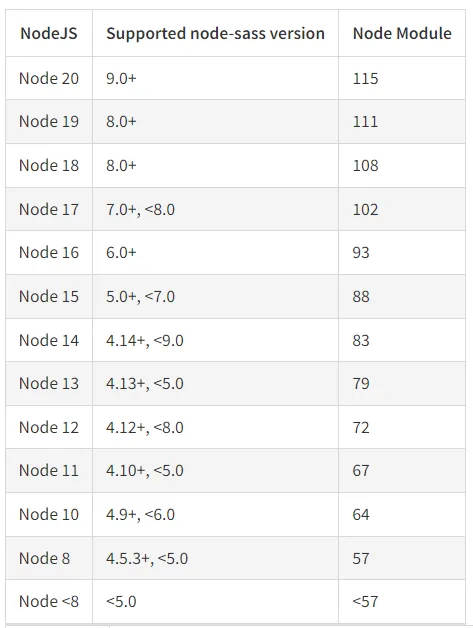
注意版本对应
纯净状态下
指的是未进行处理 node-sass 问题的其他操作
- 如果有 yarn.lock,删除 yarn.lock
- 通过 yarn 下载,npm i yarn -g
- yarn 即可
全局移除 node-sass,然后重新安装
使用对应的包管理器,卸载 node-sass,再重新安装 node-sass
npm uninstall node-sass
npm install node-sass
yarn remove node-sass
yarn add node-sass -D
pnpm remove node-sass
pnpm add node-sass
设置 sass_binary_site
yarn config set sass_binary_site https://registry.npmmirror.com/node-sass -g

npm config set sass-binary-site https://registry.npmmirror.com/node-sass
镜像源切换后速度无提升
- 清除缓存:使用
npm cache clean --force清除npm缓存,或使用yarn cache clean清除yarn缓存。 - 尝试其他镜像源:如果当前镜像源速度慢,可以尝试切换到其他国内镜像源,使用nrm工具可以方便地进行切换。
镜像源设置不生效
用户在设置镜像源后,可能会发现设置没有生效,这通常是因为配置文件未正确更新或配置文件的优先级问题。
解决方法:
- 确认配置文件:检查
.npmrc或.yarnrc文件中是否正确设置了 registry 字段。 - 优先级问题:对于yarn,
.yarnrc文件中的配置优先级高于.npmrc,确保在正确的文件中设置。
特定包无法下载
解决方法:
- 检查官方源:访问npm官网确认包是否存在以及版本信息。
- 临时切换源:如果包在官方源存在,可以临时切换回官方源进行安装,使用如下命令:
npm --registry https://registry.npmjs.org/ install <package-name>

yarn add <package-name> --registry=https://registry.yarnpkg.com/

pnpm --registry https://registry.npmjs.org/ add <package-name>
评论区